


TIP OF THE WEEK · No 01 · GUIDE PFB · MEMBER SERVICES
How to book your seat online at Poker France Belgique? The complete guide, step by step
Booking a tournament at Poker France Belgique is done via the event’s page, without having to phone the room. The new site distinguishes members whose profile is complete from those who still need to provide certain information. In both cases the aim is the same: obtain a personal ticket that can be checked at reception, while keeping payment to be made on site. Here is the route to follow and the solutions to the most common difficulties.
Find the right tournament in the calendar
Open the calendar PFB, choose the date, room and format that interest you, then view the full event page. Check the start time, the advertised price, re‑entry options, the late‑registration cut‑off, any bonuses and the availability of PFB seats. The calendar may also indicate a guarantee or a special format. Do not confuse the number of reservations open on the site with the room’s total capacity: a portion of the seats may be managed directly on‑site.
Book with one click using a complete profile
Log in to your member account. When the required information is provided, the “Book with 1 click” button appears on the tournament page. Before confirming, you must accept the general terms of sale, the Rules & ROI document and the principle of payment on site. This confirmation creates a registration: it does not mean that the tournament fee has been collected online. Therefore check the payment instructions and keep a payment method accepted by the room.
Use the basket if the profile needs to be completed
If your profile does not yet allow one‑click booking, the site will route you through the basket. This is normal: the form collects, among other things, the date of birth needed for identification and age verification. Once recorded on your account, this data should normally not be requested again for each registration. Before confirming, reread the tournament information and the accepted conditions. To avoid mistakes, each player must use their own account and personal details.
Retrieve your QR‑code ticket and its number
After booking, a ticket email is sent. It contains a QR code and an identifier of the form PFB-XXXX-XXXX. The same ticket remains accessible via “My account → My registrations”, where the “View ticket” button enlarges the QR code. A “Resend email” link is provided, limited to one resend every ten minutes. If the message does not appear, start by checking your spam folder: the absence of an email does not necessarily mean the booking failed.
Arrive at the desk, manage the waiting list and cancel
Present your ticket on your phone or printed: staff scan the QR code and confirm your arrival. In case of display issues, the alphanumeric code can be entered manually. When no PFB seat is available, the site may offer a waiting list; a freed seat is offered according to the predetermined order. If you need to withdraw, use the cancellation link in the conditions specified for the tournament; the default free‑cancellation period is 24 hours before the start, but may vary depending on the event.
The point of caution not to overlook
Before you go to the room, run a full test of the process on your own account: log in, access the calendar, view a tournament’s details and check the “My registrations” section. If you share a computer with another member, log out at the end of the session to avoid bookings on the wrong profile. Also verify that the contact details on file are valid. If a waiting list appears, wait for confirmation rather than assuming your spot is guaranteed. The system is designed to prevent double bookings, not to guarantee a seat beyond the announced capacity.
Mini‑workshop: put this tip into practice
To practice this tip during your next session, start by asking yourself: “Find the right tournament in the calendar”. Then identify a concrete situation that made you hesitate and link it to the theme “Use the basket if the profile needs to be completed”. Review the three reflexes summarised below and explain, in your own words, which one should have weighed most in your decision. After the tournament, note the information you knew at the time of choice, what you discovered afterwards and what you would do in a comparable context. This exercise is carried out away from the table, without strategic assistance during a live hand. One quality observation per week is enough to build a regular analysis method.
Concrete example at the table or in the club
You choose a Friday tournament. Your profile is complete: you are logged in, you accept the T&Cs, Rules & ROI and payment on site, then click “Reserve in 1 click”. The ticket appears in “My entries”. On Friday, you present the QR code at the desk. If your phone is dead, the reservation code noted separately allows staff to retrieve the ticket. Reserving does not exempt you from arriving on time and respecting the conditions specific to this tournament.
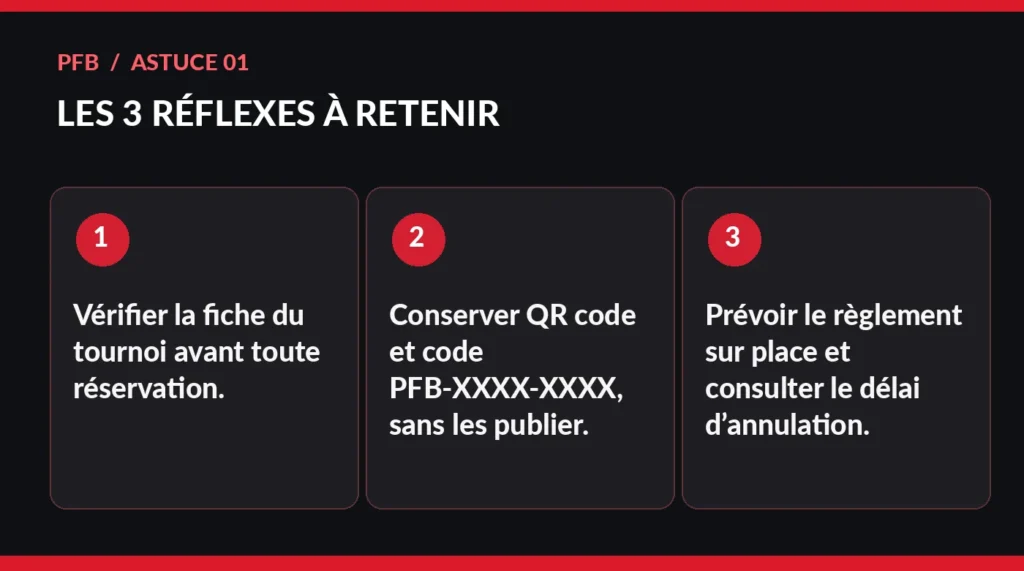
The 3 reflexes to remember
- Check the tournament sheet before any reservation.
- Keep QR code and code PFB-XXXX-XXXX, without publishing them.
- Allow for payment on site and consult the cancellation deadline.
Frequently asked questions
Is a reservation an online payment?
No: in the described process, the reservation creates the ticket and payment is made on site.
Where to resend the ticket if the e‑mail is lost?
In “My account → My entries”, use “Resend e‑mail” after checking the spam folder; a resend is possible every ten minutes.
To go further
References, applicable rules and practical information:
Original educational article by the editorial team PFB. The examples are illustrative and do not guarantee any result. The official tournament conditions and the club’s rules prevail. Poker involves loss risks: set a spending limit and stick to it.